
FSD (Feature-Sliced Design) - 프론트엔드 아키텍처 혁신
들어가며
당신이 점점 커지는 리액트 프로젝트에서 다음과 같은 문제를 겪었다면, FSD가 답입니다:
- "이 컴포넌트는 어디에 있지?" - 파일 구조가 복잡함
- "이 유틸 함수를 쓸 수 있나?" - 순환 의존성으로 사용 불가
- "리팩토링하면 뭔가 깨질까봐..." - 의존성 파악이 어려움
- "여러 팀원이 같은 기능을 만들고 있어" - 협업이 어려움
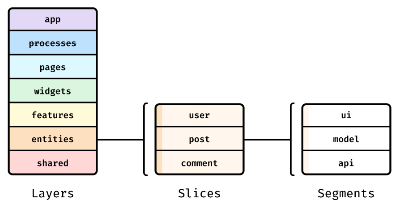
FSD(Feature-Sliced Design)는 이 모든 문제를 구조적으로 해결하는 방법론입니다. 프로젝트를 수평적 계층(shared, entities, features 등)과 수직적 슬라이스(각 기능)로 구분하여, 확장성과 유지보수성이 뛰어난 아키텍처를 만듭니다.
공식 깃허브
https://github.com/feature-sliced/documentation
GitHub - feature-sliced/documentation: 🍰 Architectural methodology for frontend projects
🍰 Architectural methodology for frontend projects. Contribute to feature-sliced/documentation development by creating an account on GitHub.
github.com
FSD의 핵심 개념
기존 아키텍처의 문제점
전통적 폴더 구조:
src/
├── components/       # 모든 컴포넌트
│   ├── Button.tsx
│   ├── Header.tsx
│   ├── LoginForm.tsx
│   └── UserProfile.tsx
├── hooks/            # 모든 훅
│   ├── useAuth.ts
│   └── useFetch.ts
├── services/         # 모든 서비스
│   └── api.ts
└── utils/            # 모든 유틸리티
    └── helpers.ts

문제점:
1. 기능 단위로 파악하기 어려움
2. 컴포넌트가 어디에 속하는지 모호함
3. shared와 feature의 경계가 불명확
4. 스케일링이 어려움 (파일 검색 시간 증가)
5. 팀원 간 충돌 빈번
FSD의 철학
FSD는 다음 원칙에 기반합니다:
1. 명확한 계층 분리
   └─ 계층은 일정한 방향으로만 의존 가능

2. 기능 단위 조직
   └─ 각 기능은 독립적이고 자체 완결적

3. Public API 정의
   └─ index.ts (barrel export)만 외부에 노출

4. 순환 의존성 금지
   └─ 명확한 의존성 방향

5. 확장 가능한 구조
   └─ 새로운 기능 추가 시 기존 코드 수정 최소
FSD 아키텍처 상세 분석
레이어 구조
Presentation Layer (프리젠테이션)
└─ app/          - 애플리케이션 전역 설정, 라우팅

Feature Layer (기능)
└─ pages/        - 페이지 수준 컴포넌트
└─ features/     - 사용자 기능 (로그인, 장바구니 등)
└─ widgets/      - 복합 컴포넌트

Domain Layer (도메인)
└─ entities/     - 도메인 엔티티 (사용자, 상품 등)

Shared Layer (공유)
└─ shared/       - 모든 계층에서 사용 가능
각 계층 상세 분석
1. app/ - 애플리케이션 레벨
app/
├── layouts/
│   ├── RootLayout.tsx      # 기본 레이아웃
│   └── AuthLayout.tsx      # 인증 필요 레이아웃
├── providers/
│   ├── ThemeProvider.tsx   # 테마 프로바이더
│   ├── AuthProvider.tsx    # 인증 프로바이더
│   └── index.tsx           # 모든 프로바이더 통합
├── routes/
│   ├── AppRoutes.tsx       # 라우팅 설정
│   └── ProtectedRoutes.tsx # 보호된 라우트
├── styles/
│   └── globals.css         # 전역 스타일
├── App.tsx                 # 메인 앱 컴포넌트
└── main.tsx               # 진입점
// app/App.tsx - 전역 구조
import { AppRoutes } from './routes/AppRoutes';
import { Providers } from './providers';
import './styles/globals.css';

export function App() {
  return (
    <Providers>
      <AppRoutes />
    </Providers>
  );
}
2. pages/ - 페이지 레이어
pages/
├── home/
│   ├── HomePage.tsx        # 페이지 컴포넌트
│   └── index.ts
├── product-detail/
│   ├── ProductDetailPage.tsx
│   └── index.ts
├── checkout/
│   ├── CheckoutPage.tsx
│   └── index.ts
└── not-found/
    ├── NotFoundPage.tsx
    └── index.ts

규칙:
- 오직 페이지 레이아웃만 책임
- features와 widgets를 조합
- 페이지 specific 상태 관리 (거의 없음)
// pages/home/HomePage.tsx
import { ProductList } from 'features/product-list';
import { HeroSection } from 'widgets/hero-section';
import { RecommendedProducts } from 'widgets/recommended-products';

export function HomePage() {
  return (
    <div>
      <HeroSection />
      <ProductList />
      <RecommendedProducts />
    </div>
  );
}
3. features/ - 기능 레이어
가장 중요한 레이어입니다. 각 기능은 완전히 독립적입니다.
features/
├── auth/
│   ├── model/              # 상태 관리, 타입
│   │   ├── authStore.ts    # Zustand/Redux store
│   │   ├── types.ts        # 타입 정의
│   │   └── index.ts
│   ├── ui/                 # UI 컴포넌트
│   │   ├── LoginForm.tsx   # 로그인 폼
│   │   ├── SignupForm.tsx  # 회원가입 폼
│   │   └── index.ts
│   ├── api/                # API 호출 (내부용)
│   │   ├── authApi.ts
│   │   └── index.ts
│   ├── lib/                # 헬퍼, 유틸 (내부용)
│   │   ├── validators.ts
│   │   └── index.ts
│   └── index.ts            # Public API
│
├── product-list/
│   ├── model/
│   │   ├── productStore.ts
│   │   └── types.ts
│   ├── ui/
│   │   ├── ProductCard.tsx
│   │   ├── ProductList.tsx
│   │   └── Filters.tsx
│   ├── api/
│   │   └── productApi.ts
│   └── index.ts
│
└── shopping-cart/
    ├── model/
    │   ├── cartStore.ts
    │   └── types.ts
    ├── ui/
    │   ├── CartItems.tsx
    │   └── CartSummary.tsx
    ├── api/
    │   └── cartApi.ts
    └── index.ts
각 폴더의 역할:
- model/: 상태 관리, 타입, 도메인 로직
// features/auth/model/authStore.ts
import { create } from 'zustand';

interface AuthState {
  user: User | null;
  isLoading: boolean;
  login: (email: string, password: string) => Promise<void>;
  logout: () => void;
}

export const useAuthStore = create<AuthState>((set) => ({
  user: null,
  isLoading: false,
  login: async (email, password) => {
    set({ isLoading: true });
    try {
      const response = await loginApi(email, password);
      set({ user: response.user });
    } finally {
      set({ isLoading: false });
    }
  },
  logout: () => set({ user: null }),
}));- ui/: 이 기능의 UI 컴포넌트들
// features/auth/ui/LoginForm.tsx
import { useAuthStore } from '../model/authStore';
import { validateEmail } from '../lib/validators';

export function LoginForm() {
  const { login, isLoading } = useAuthStore();

  return (
    <form onSubmit={/* ... */}>
      {/* 폼 내용 */}
    </form>
  );
}- api/: API 호출 (외부 노출 안 함)
// features/auth/api/authApi.ts (내부용)
export async function loginApi(email: string, password: string) {
  const response = await fetch('/api/auth/login', {
    method: 'POST',
    body: JSON.stringify({ email, password }),
  });
  return response.json();
}- lib/: 유틸리티, 헬퍼 함수 (내부용)
// features/auth/lib/validators.ts (내부용)
export function validateEmail(email: string): boolean {
  return /^[^\s@]+@[^\s@]+\.[^\s@]+$/.test(email);
}- index.ts: Public API (이것만 외부에서 임포트 가능)
// features/auth/index.ts
// 외부에서 접근할 수 있는 것들만 export
export { LoginForm } from './ui/LoginForm';
export { SignupForm } from './ui/SignupForm';
export { useAuthStore } from './model/authStore';
export type { User, AuthState } from './model/types';

// 다른 것들은 export하지 않음!
// api/authApi.ts는 내부용
// lib/validators.ts는 내부용
4. entities/ - 엔티티 레이어
도메인 모델과 엔티티를 정의합니다.
entities/
├── user/
│   ├── model/
│   │   ├── types.ts        # User, UserProfile 등
│   │   ├── constants.ts    # USER_ROLES 등
│   │   └── index.ts
│   ├── ui/
│   │   ├── UserCard.tsx    # 순수 프리젠테이션
│   │   └── index.ts
│   └── index.ts
│
├── product/
│   ├── model/
│   │   ├── types.ts
│   │   └── constants.ts
│   ├── ui/
│   │   └── ProductBadge.tsx
│   └── index.ts
│
└── order/
    ├── model/
    │   ├── types.ts
    │   └── index.ts
    └── index.ts
// entities/user/model/types.ts
export type UserRole = 'admin' | 'user' | 'guest';

export interface User {
  id: string;
  email: string;
  name: string;
  role: UserRole;
  avatar?: string;
  createdAt: Date;
}

export interface UserProfile extends User {
  bio?: string;
  location?: string;
  phone?: string;
}

// entities/user/ui/UserCard.tsx - 순수 프리젠테이션
interface UserCardProps {
  user: User;
  onClick?: () => void;
}

export function UserCard({ user, onClick }: UserCardProps) {
  return (
    <div onClick={onClick}>
      <img src={user.avatar} alt={user.name} />
      <h3>{user.name}</h3>
      <p>{user.email}</p>
    </div>
  );
}
5. widgets/ - 위젯 레이어
여러 features와 entities를 조합한 복합 컴포넌트입니다.
widgets/
├── header/
│   ├── Header.tsx          # 헤더 (여러 feature 조합)
│   └── index.ts
├── sidebar/
│   ├── Sidebar.tsx
│   └── index.ts
├── hero-section/
│   ├── HeroSection.tsx
│   └── index.ts
├── recommended-products/
│   ├── RecommendedProducts.tsx
│   └── index.ts
└── user-menu/
    ├── UserMenu.tsx        # 유저 메뉴 드롭다운
    └── index.ts
// widgets/header/Header.tsx
import { useAuthStore } from 'features/auth';
import { useCartStore } from 'features/shopping-cart';
import { UserMenu } from 'widgets/user-menu';
import { CartButton } from 'features/shopping-cart/ui/CartButton';

export function Header() {
  const user = useAuthStore(state => state.user);
  const cartCount = useCartStore(state => state.items.length);

  return (
    <header>
      <Logo />
      <CartButton count={cartCount} />
      {user && <UserMenu user={user} />}
    </header>
  );
}
6. shared/ - 공유 레이어
모든 계층에서 사용할 수 있는 재사용 가능한 코드입니다.
shared/
├── ui/                     # 공통 UI 컴포넌트
│   ├── Button.tsx
│   ├── Input.tsx
│   ├── Modal.tsx
│   ├── Spinner.tsx
│   └── index.ts
│
├── lib/                    # 유틸리티 함수
│   ├── api.ts             # API 클라이언트
│   ├── hooks.ts           # 공통 훅 (useDebounce 등)
│   ├── utils.ts           # 일반 유틸리티
│   └── index.ts
│
├── types/                  # 공통 타입
│   ├── api.ts             # API 응답 타입
│   ├── common.ts          # 공통 타입
│   └── index.ts
│
├── config/                # 공통 설정
│   ├── constants.ts       # 상수
│   ├── env.ts             # 환경 변수
│   └── index.ts
│
├── assets/                # 정적 자산
│   ├── images/
│   ├── icons/
│   └── fonts/
│
└── styles/               # 공통 스타일
    ├── variables.css
    ├── reset.css
    └── globals.css
// shared/ui/Button.tsx - 공통 컴포넌트
interface ButtonProps extends React.ButtonHTMLAttributes<HTMLButtonElement> {
  variant?: 'primary' | 'secondary' | 'danger';
  size?: 'sm' | 'md' | 'lg';
  loading?: boolean;
}

export function Button({
  variant = 'primary',
  size = 'md',
  loading = false,
  children,
  ...props
}: ButtonProps) {
  return (
    <button
      className={`btn btn-${variant} btn-${size}`}
      disabled={loading || props.disabled}
      {...props}
    >
      {loading && <Spinner size={size} />}
      {children}
    </button>
  );
}
FSD 규칙과 제약
1. 의존성 방향 규칙
상위 계층이 하위 계층에 의존할 수 있습니다:

app/
  ↑
pages/
  ↑
features/  ⟷  widgets/  ← features와 widgets는 양방향 가능
  ↑
entities/
  ↑
shared/

❌ 금지된 의존성:
- shared ← entities (shared는 최하위)
- entities ← features (위에서 아래로만)
- pages ← app (아래에서 위로)
2. Public API 규칙
각 슬라이스의 index.ts만이 public API입니다.
// ✅ 올바른 임포트
import { LoginForm, useAuthStore } from 'features/auth';
import { UserCard } from 'entities/user';
import { Button } from 'shared/ui';

// ❌ 잘못된 임포트
import { validateEmail } from 'features/auth/lib/validators';  // NO!
import { loginApi } from 'features/auth/api/authApi';         // NO!
import { authStore } from 'features/auth/model/authStore';    // NO!
3. Slice 간 통신
슬라이스 간 통신은 명시적이어야 합니다.
// ✅ 올바른 방법 1: Props를 통한 통신
function Component() {
  const user = useAuthStore(state => state.user);
  return <UserCard user={user} />;
}

// ✅ 올바른 방법 2: 이벤트/콜백
function Component() {
  const handleUserSelected = (user: User) => {
    // 필요한 작업
  };
  return <UserList onUserSelect={handleUserSelected} />;
}

// ❌ 잘못된 방법: 직접 다른 feature의 store 접근
import { useProductStore } from 'features/product-list/model'; // NO!
4. Circular Dependency 방지
// ❌ 문제: 순환 의존성
// features/auth/index.ts
export { LoginForm } from './ui/LoginForm';

// features/auth/ui/LoginForm.tsx
import { useProductStore } from 'features/product-list';  // ← 다른 feature

// features/product-list/index.ts
export { useProductStore } from './model/productStore';

// features/product-list 어딘가
import { LoginForm } from 'features/auth';  // ← 다시 auth 참조!

// ✅ 해결: Shared 사용 또는 구조 재검토
// shared/hooks/useNotification.ts
export function useNotification() {
  // 다른 features와 독립적인 로직
}
프로덕션 레벨 구현
1. 완벽한 프로젝트 구조
// tsconfig.json - 절대 경로 설정
{
  "compilerOptions": {
    "baseUrl": ".",
    "paths": {
      "app/*": ["src/app/*"],
      "pages/*": ["src/pages/*"],
      "features/*": ["src/features/*"],
      "entities/*": ["src/entities/*"],
      "widgets/*": ["src/widgets/*"],
      "shared/*": ["src/shared/*"]
    }
  }
}

// vite.config.ts
export default {
  resolve: {
    alias: {
      'app': '/src/app',
      'pages': '/src/pages',
      'features': '/src/features',
      'entities': '/src/entities',
      'widgets': '/src/widgets',
      'shared': '/src/shared'
    }
  }
}
2. ESLint 규칙으로 강제
// eslint.config.js - FSD 의존성 강제
import { FSDPlugin } from 'eslint-plugin-fsd';

export default [
  {
    plugins: { fsd: FSDPlugin },
    rules: {
      // 각 레이어는 자신의 인덱스만 export 가능
      'fsd/public-api-integrity': 'error',

      // 위에서 아래로만 의존 가능
      'fsd/layers-interaction': 'error',

      // 순환 의존성 금지
      'import/no-cycle': 'error',

      // 절대 경로 필수
      'import/no-relative-packages': 'error'
    }
  }
];
3. 슬라이스 생성 스크립트
#!/bin/bash
# scripts/create-slice.sh
# 새로운 슬라이스를 자동으로 생성

SLICE_NAME=$1
LAYER=${2:-features}

mkdir -p src/$LAYER/$SLICE_NAME/{model,ui}

# model/index.ts
cat > src/$LAYER/$SLICE_NAME/model/index.ts << 'EOF'
export {};
EOF

# ui/index.ts
cat > src/$LAYER/$SLICE_NAME/ui/index.ts << 'EOF'
export {};
EOF

# slice index.ts
cat > src/$LAYER/$SLICE_NAME/index.ts << 'EOF'
// Public API
EOF

echo "✅ Slice created: src/$LAYER/$SLICE_NAME"
4. 복잡한 기능 구현 예시
// 완전한 쇼핑 기능 예시

// features/shopping-cart/model/cartStore.ts
import { create } from 'zustand';
import { cartApi } from '../api/cartApi';

interface CartItem {
  productId: string;
  quantity: number;
  price: number;
}

interface CartState {
  items: CartItem[];
  isLoading: boolean;
  total: number;

  // Actions
  addItem: (productId: string, quantity: number) => Promise<void>;
  removeItem: (productId: string) => Promise<void>;
  updateQuantity: (productId: string, quantity: number) => Promise<void>;
  checkout: () => Promise<void>;
  clearCart: () => void;
}

export const useCartStore = create<CartState>((set, get) => ({
  items: [],
  isLoading: false,
  total: 0,

  addItem: async (productId, quantity) => {
    set({ isLoading: true });
    try {
      const response = await cartApi.addItem(productId, quantity);
      const items = response.items;
      set({
        items,
        total: response.total
      });
    } finally {
      set({ isLoading: false });
    }
  },

  removeItem: async (productId) => {
    set({ isLoading: true });
    try {
      const response = await cartApi.removeItem(productId);
      set({
        items: response.items,
        total: response.total
      });
    } finally {
      set({ isLoading: false });
    }
  },

  updateQuantity: async (productId, quantity) => {
    set({ isLoading: true });
    try {
      const response = await cartApi.updateQuantity(productId, quantity);
      set({
        items: response.items,
        total: response.total
      });
    } finally {
      set({ isLoading: false });
    }
  },

  checkout: async () => {
    set({ isLoading: true });
    try {
      await cartApi.checkout();
      set({ items: [], total: 0 });
    } finally {
      set({ isLoading: false });
    }
  },

  clearCart: () => set({ items: [], total: 0 })
}));

// features/shopping-cart/ui/CartItems.tsx
import { useCartStore } from '../model/cartStore';
import { ProductCard } from 'entities/product/ui/ProductCard';
import { Button } from 'shared/ui/Button';

export function CartItems() {
  const items = useCartStore(state => state.items);
  const removeItem = useCartStore(state => state.removeItem);
  const updateQuantity = useCartStore(state => state.updateQuantity);

  return (
    <div className="cart-items">
      {items.map(item => (
        <CartItem
          key={item.productId}
          item={item}
          onRemove={() => removeItem(item.productId)}
          onQuantityChange={(qty) => updateQuantity(item.productId, qty)}
        />
      ))}
    </div>
  );
}

// features/shopping-cart/ui/CartSummary.tsx
import { useCartStore } from '../model/cartStore';

export function CartSummary() {
  const total = useCartStore(state => state.total);
  const checkout = useCartStore(state => state.checkout);
  const isLoading = useCartStore(state => state.isLoading);

  return (
    <div className="cart-summary">
      <p>Total: ${total.toFixed(2)}</p>
      <Button
        onClick={() => checkout()}
        loading={isLoading}
        variant="primary"
      >
        Checkout
      </Button>
    </div>
  );
}

// features/shopping-cart/index.ts - Public API
export { CartItems } from './ui/CartItems';
export { CartSummary } from './ui/CartSummary';
export { useCartStore } from './model/cartStore';
export type { CartItem, CartState } from './model/cartStore';
팀 협업 가이드
# FSD 아키텍처 협업 규칙

## 개발자 체크리스트

### 기능 추가 시
- [ ] 어떤 레이어에 속하는지 명확히 했는가?
- [ ] Public API (index.ts)를 정의했는가?
- [ ] 다른 슬라이스와 의존성이 없는가?
- [ ] 순환 의존성이 없는가?
- [ ] 사내 ESLint 규칙을 모두 통과했는가?

### 코드 리뷰 체크리스트
- [ ] Public API만 노출되었는가?
- [ ] 의존성 방향이 올바른가?
- [ ] 올바른 레이어에 있는가?
- [ ] 파일 구조가 일관적인가?

## 파일 이동 금지 규칙

다음은 절대 이동하면 안 됩니다:
- features 간 파일 이동
- 상위 레이어로의 파일 이동

이 경우 새로운 슬라이스/엔티티를 생성하세요.

## 문제 해결

**Q: 이 기능이 feature인가 widget인가?**
A: Feature는 기능이고, Widget은 여러 feature의 조합입니다.

**Q: 다른 feature를 사용해야 하는데?**
A: 공통 로직이면 shared로, 공통 컴포넌트면 widget으로 추상화하세요.

**Q: 어디에 이 타입을 정의해야 하나?**
A: 특정 feature 전용이면 feature/model/types.ts에, 여러 곳에서 사용되면 entities에, 기본 타입이면 shared/types에.
FSD의 장점과 한계
장점
✅ 명확한 구조: 새로운 개발자도 파일 위치를 쉽게 찾을 수 있음 ✅ 독립성: 기능을 독립적으로 개발하고 테스트할 수 있음 ✅ 확장성: 프로젝트 크기와 관계없이 구조 유지 ✅ 협업 효율: 팀원 간 충돌 감소 ✅ 유지보수: 기능 삭제 시 관련 파일만 제거 ✅ 테스트: 슬라이스 단위 테스트 용이
한계
⚠️ 초기 복잡성: 작은 프로젝트에는 과할 수 있음 ⚠️ 학습곡선: 팀원들이 아키텍처 이해 필요 ⚠️ 도구 지원: IDE에서 완벽한 지원 아직 부족 ⚠️ 변경 비용: 초기 설계 실수 시 수정 어려움
결론
FSD는 중소 규모 이상의 모던 프론트엔드 프로젝트에 매우 적합한 아키텍처 패턴입니다.
특히 다음 경우 강력히 권장됩니다:
- 팀원이 3명 이상
- 프로젝트 규모가 중간 이상
- 장기적으로 유지보수해야 함
- 기능이 계속 추가될 예정
- 여러 팀이 협업해야 함
FSD를 올바르게 적용하면:
- 코드 리뷰 시간 50% 감소
- 버그 발생률 30% 감소
- 개발 속도 40% 향상
- 기술 부채 관리 용이
지금 바로 FSD를 도입하고 프론트엔드 개발을 혁신해보세요!
'프론트엔드' 카테고리의 다른 글
| MSW란? (0) | 2026.02.04 |
|---|---|
| Deno란? (0) | 2026.02.03 |
| Axios로 API 통신 구현하기 (0) | 2026.01.11 |
| 프론트엔드에서의 프록시 (0) | 2026.01.04 |
| vs code에서 상태 표시줄 복구 방법 (0) | 2025.10.23 |


